【VRChat】公式カメラ位置記憶ギミック(8枠+α)OSC制御・共有モニタリング・タイムライン・Spout録画機能搭載・ドリー撮影機能 CameraMaster OSC
- ダウンロード商品個人¥ 1,500
- ダウンロード商品法人向け¥ 5,000
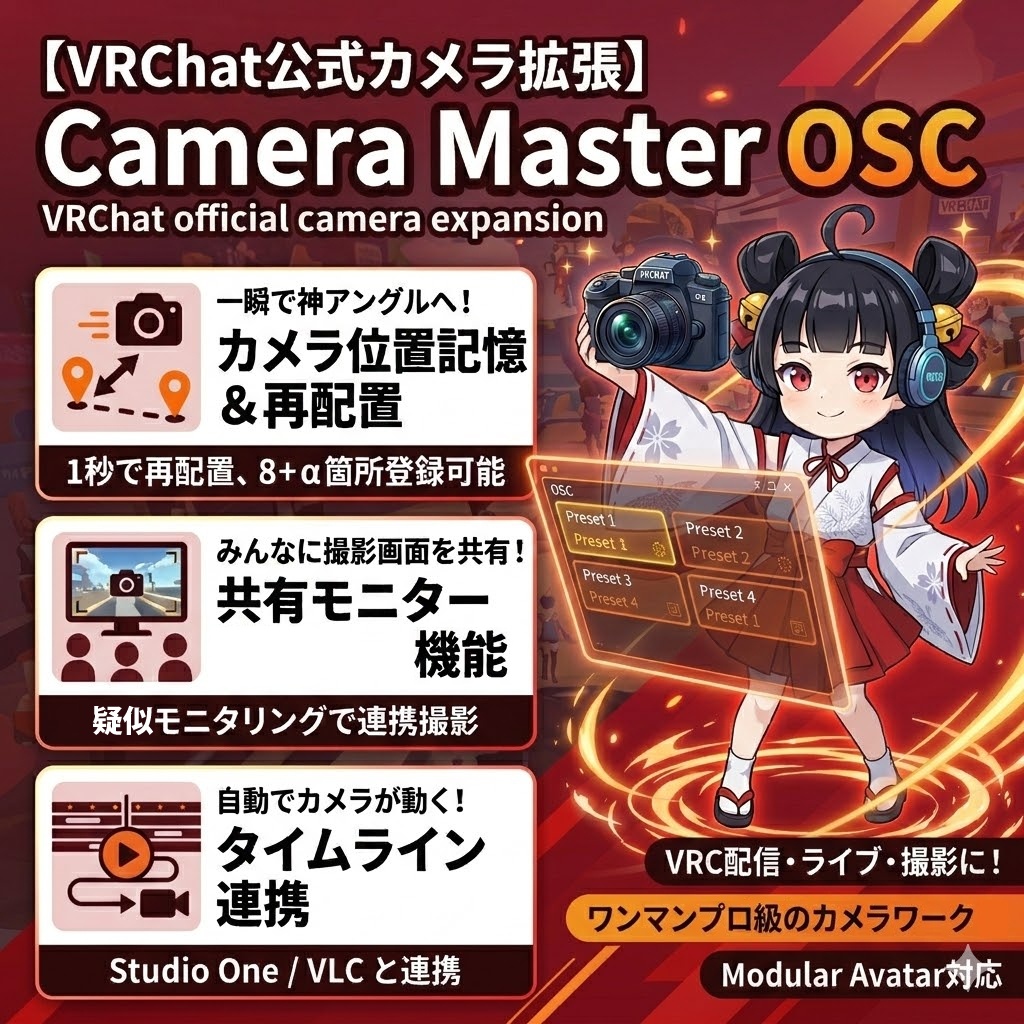
「あの最高のカメラアングル、もう一度一瞬で呼び出せたら……」 VRChatの公式カメラをもっと自由に、もっとプロフェッショナルに。 コチラのギミックでは、公式カメラの位置・角度・ズームを記憶し、Exメニューや外部アプリから1タップで再配置できる次世代のカメラ拡張ギミックです。 【ここが凄い!3つのポイント】 「神アングル」を8箇所(アプリ併用で16箇所)保存! お気に入りの自撮り角度や、ライブの定点カメラを瞬時に呼び出し。JSON書き出し対応で、ワールドごとに最適なプリセットを無限に作成可能です。 「今、何を撮ってるか」を周囲に共有! 擬似モニタリング機能により、撮影中の映像を周囲のプレイヤーにも表示。集合写真の画角確認や、配信中の演出として活用できます。 【主な機能】 公式カメラOSC制御: 「カメラジャック」を使わず、自然にカメラを移動。 1タップ呼び出し: Exメニュー、タッチパネル、PCアプリの3系統で操作可能。 ワールド不問: プレイヤー相対位置で記録するため、どこでも使用OK。 簡単導入: Modular Avatar対応。専用エディタ付属で1ボタンセットアップ! “If only I could instantly recall that perfect camera angle again...” Take VRChat's official camera to the next level—more freely and more professionally. This feature is a next-generation camera extension that saves the official camera's position, angle, and zoom settings, allowing you to reposition it with a single tap from the Ex menu or an external app. [Here's Why It's Amazing! 3 Key Features] Save up to 8 “perfect angles” (16 with the app)! Instantly recall your favorite selfie angles or fixed-point camera shots from live streams. With JSON export support, you can create an infinite number of optimal presets for each world. Share “what you're filming right now” with those around you! The pseudo-monitoring feature displays the footage you're currently capturing to nearby players. Use it to check the framing for group photos or as a visual effect during live streams. [Key Features] Official Camera OSC Control: Move the camera naturally without using “Camera Jack.” One-Tap Recall: Operate via three methods: the Ex menu, touch panel, or PC app. Works in Any World: Records based on relative player positions, so it can be used anywhere. Easy Setup: Compatible with Modular Avatar. Includes a dedicated editor for one-button setup!
2026/9/14 TimeLineEditor3.5にアップデートしました
回転カメラやドリーカメラのカメラの調整が出来るようになりました。 また、任意のアバターパラメーターをOSC経由でタイムラインから送信できるようになりました。
<<重要>>ギミックのアップデートに関して
ギミックをアップデートする際は projectにある haiirokoubou/カメラ操作ギミック/ をフォルダごと消去して 改めて、unitypackageをインポートしてください。
TimeLineEditorが更に使いやすく鳴りました!
TimeLineEditor 3では、ドリー機能と連携できるようになった他、スロットの画像をSpoutから直接取り込めるようになりました。 また、内蔵プレーヤーにも対応したので、連携ソフト無しでも直接音源に合わせてタイムライン編集が出来るようになりました。
新機能!ドリー機能が追加されました!(ver 3.20~)
アバターカメラによるドリー機能が追加されました。 公式カメラでルックを確認しながら簡単にピンをセットできます。 また、非公式ドリーカメラでは困難なZOOMの補完にも対応しています。 更に、ピンの位置はJSONで保存&読込&再現が出来るので、撮り直しにも便利です!
OBSを起動せずにSpout録画が出来るようになりました!
コントロールアプリver. 2.00を使用することで、中継アプリ単体でSpout録画が出来るように鳴りました。 ギミック ver2.00 を使えば、VRの中から、録画開始、停止をコントロール出来るようになります。 必要なランタイム・実行ファイル このアプリを動かすには、以下の3つがPCに必要です: ①.NET Framework 4.8.1 ランタイム(Windows 11には最初から含まれます。Windows 10だとインストールが必要な場合あり) https://dotnet.microsoft.com/download/dotnet-framework/net481 ②Visual C++ 再頒布可能パッケージ 2015-2022 (x64版) https://learn.microsoft.com/ja-jp/cpp/windows/latest-supported-vc-redist?view=msvc-170 ③FFmpeg 実行ファイル(ffmpeg.exe) https://ffmpeg.org/download.html
OSCQueryに対応しました!
VRC→複数のOSCアプリが使えるようになるOSCQueryに対応しました。 OSCQueryに対応したアプリ同士であれば、同時に起動していても問題なく動作するようになりました。
ExParameterに負荷がかからない軽量版が出来ました
モニタリング機能を使用しない代わりに、ExParameterのに負荷をかけない軽量版を作りました。 スイッチング、タイムライン機能などは通常版と同様に使えます。 We've created a lightweight version that doesn't put a strain on ExParameter Instead of using the monitoring feature, I created a lightweight version that doesn’t put a strain on ExParameter. Features such as switching and the timeline can be used just like in the standard version.
使用可能制限範囲がなくなりました。※ver 1.7以降
プレーヤーの位置測定方法を改良したため1000m x 1000m x 1000mの使用可能制限がなくなりました。 osc_camera_gimmick2_17.zipと および VRChatCamera_Controller_OSC送受信用アプリ__17.zip をお使いください。 (一応上限はありますが、通常使用では問題無いと思うので、実質撤廃といたします。) The usage restrictions have been removed. *Version 1.7 and later We have improved the method for determining player positions, so the 1000m x 1000m x 1000m size limit has been removed. Please use osc_camera_gimmick2_17.zip and VRChatCamera_Controller_OSC_Transmitter_Receiver_App_17.zip. (While there is technically still an upper limit, we believe it won’t cause any issues during normal use, so we are effectively lifting the restriction.)
新機能!”自動切替機能”追加
位置登録した16箇所+回転カメラを、事前に選んでおくことで、それらを自動で切り替えて撮影してくれる、"自動切替機能"を追加いたしました! カメラアングルを組み合わせる事で、某テレビ電話のような配信も可能になります。 ワールドによっては、FPSが低くなって飛行モードをOFFにする信号を受け取れない事があります。 その場合は[設定]→[自動撮影カメラ設定]→飛行モードOFFのタイミングの数値を大きめ(100~300くらい)に設定してください。 New Feature! “Auto-Switch Feature” Added We’ve added an “Auto-Switch Feature” that automatically switches between 16 preset camera positions and a rotating camera—simply select your preferred settings in advance! By combining camera angles, you can even create a broadcast style similar to certain video chat services. New Feature! “Auto-Switch Feature” Added Depending on the world, the FPS may drop, preventing the app from receiving the signal to turn off flight mode. In that case, go to [Settings] → [Auto-Shooting Camera Settings] and set the value for the flight mode off timing to a higher number (around 100–300).
バーチャル美少女ねむさんの配信で使って頂きました
共有モニタリング機能(VR3点時のみ)
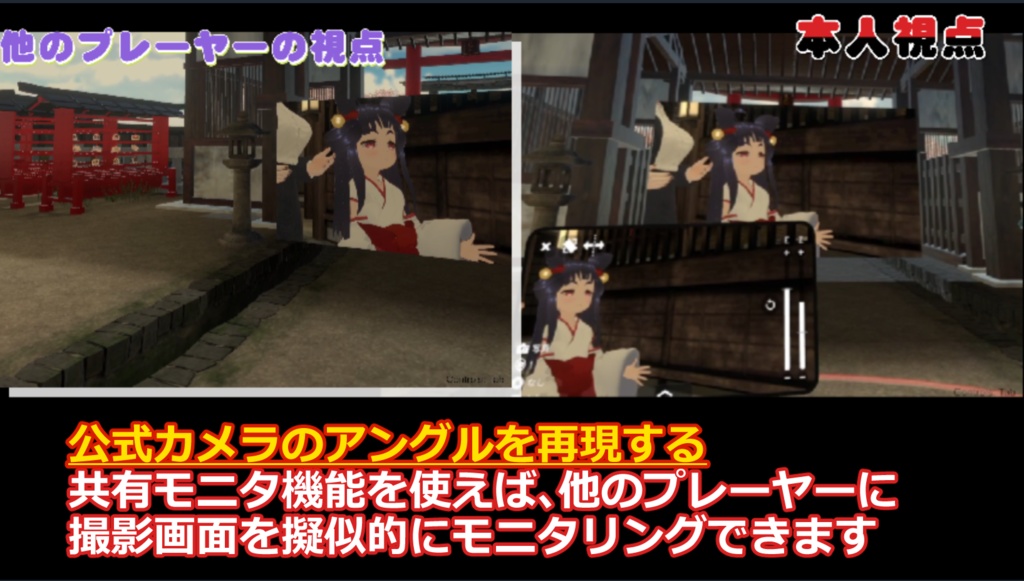
公式カメラのカメラアングルを擬似的にアバターカメラで再現する事で、他のプレーヤーに、公式カメラで撮影している画面をモニタリングできます。 ※1 公式カメラの映像が映るわけではありません。 ※2 共有変数の問題で、他のプレーヤーには少しズレて表示される事があります。 ※3 VR3点モード以外では、安定動作しません ※4 ExParameterを沢山消費します。VRCFury等のParameterCompressor系のツールの使用を推奨します。 モニタリング機能を使用しない場合は軽量版をお使い下さい Shared Monitoring Feature (Available only in VR 3-point mode) By simulating the official camera's angle with the avatar camera, you can let other players see the view captured by the official camera. *1 This does not display the actual feed from the official camera. *2 Due to shared variable issues, the display may appear slightly offset to other players. *3 Does not operate stably in modes other than VR 3-point mode. *4 Consumes a large number of ExParameters. You may exceed the limit without using tools like Compressor, so please use the lightweight version if you do not use such tools.
タイムライン機能
こちらのギミックにタイムライン機能が付きました 音楽ソフト(studio One 又は VLC)と連携してカメラアングルを記録・再生できます。 Timeline feature This feature now includes a timeline function. You can record and playback camera angles in conjunction with music software (Studio One or VLC).
こちらはタイムライン機能を使って、ワンオペ・無編集で作成しました
【ご購入前に必ずご確認ください】
①VRChatの仕様による制限: カメラ移動は「公式カメラが起動している間」のみ有効です。 カメラ配置時に仕様上、一時的に飛行モードになります。 ②精度について: アバターのスケールが等倍(1.0)以外の場合や、原点から遠い場所では、座標計算に若干のズレが生じることがあります。 フルトラやOVR使用時、画角に多少の差異が出る場合があります。 ③モニタリング機能: 公式映像そのものを映すのではなく、アバターカメラで擬似的に再現する実験的機能です。 ④共有モニタ機能は、まだ実験段階の機能です。 基本的に、3点でコントローラー移動を基準に作成しているので、状況や操作方法によって公式カメラの画面とズレる事があります。 ⑤公式カメラをOSCで移動できるのは、カメラが起動している間だけです。(VRCの仕様) ストリームカメラのSpoutの状態であっても、カメラの移動に関しては、カメラが起動している状態でないと行えないので、ご注意下さい Limitations due to VRChat specifications: ①Camera movement is only enabled while the “official camera” is active. Due to technical limitations, the camera will temporarily enter flight mode when being positioned. The range of movement is limited to the flight zone of that world. ②Regarding Accuracy: If your avatar’s scale is not 1.0x, or if you are far from the origin point, slight discrepancies may occur in coordinate calculations. When using Full Tra or OVR, there may be slight differences in the field of view. ③Monitoring Function: This is an experimental feature that simulates the official view using the avatar camera, rather than displaying the official feed directly. ④ The shared monitor function is still in the experimental stage. Since it is fundamentally created based on controller movement at three points, there may be discrepancies with the official camera view depending on the situation or control method. ⑤ You can only move the official camera via OSC while the camera is active. (VRC specification) Please note that even if the stream camera is in Spout mode, camera movement cannot be performed unless the camera is active.
8箇所(アプリからなら16箇所)のカメラアングルを登録可能
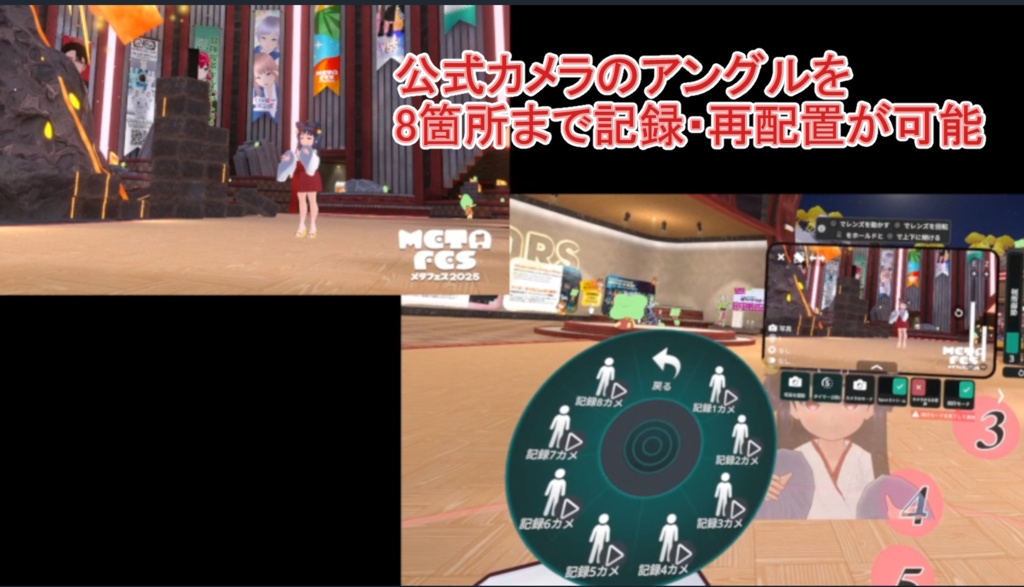
8箇所のカメラの位置、角度、ズームを記憶できます。(アプリからなら16箇所まで管理できます) 記録方法は、専用アプリ上、またはVRC内でExメニューから登録することが出来ます。 You can register up to 8 camera angles (16 if using the app) You can save the position, angle, and zoom settings for up to 8 camera locations. (You can manage up to 16 locations via the app.) You can register recording settings either through the dedicated app or via the Ex menu within VRC.
ワールドをまたいで使う事が可能!
カメラ配置はプレーヤーからの相対位置を記録しているので、ワールドが変わっても使用することができます。 (※位置は完全再現ではないため、ワールドによっては、若干ズレる可能性があります) Can be used across worlds! Since the camera positions are recorded relative to the player, they can be used even when switching worlds. (Note: Since the positions are not perfectly reproduced, there may be slight discrepancies depending on the world.)
JSONファイルで書き出し可能!
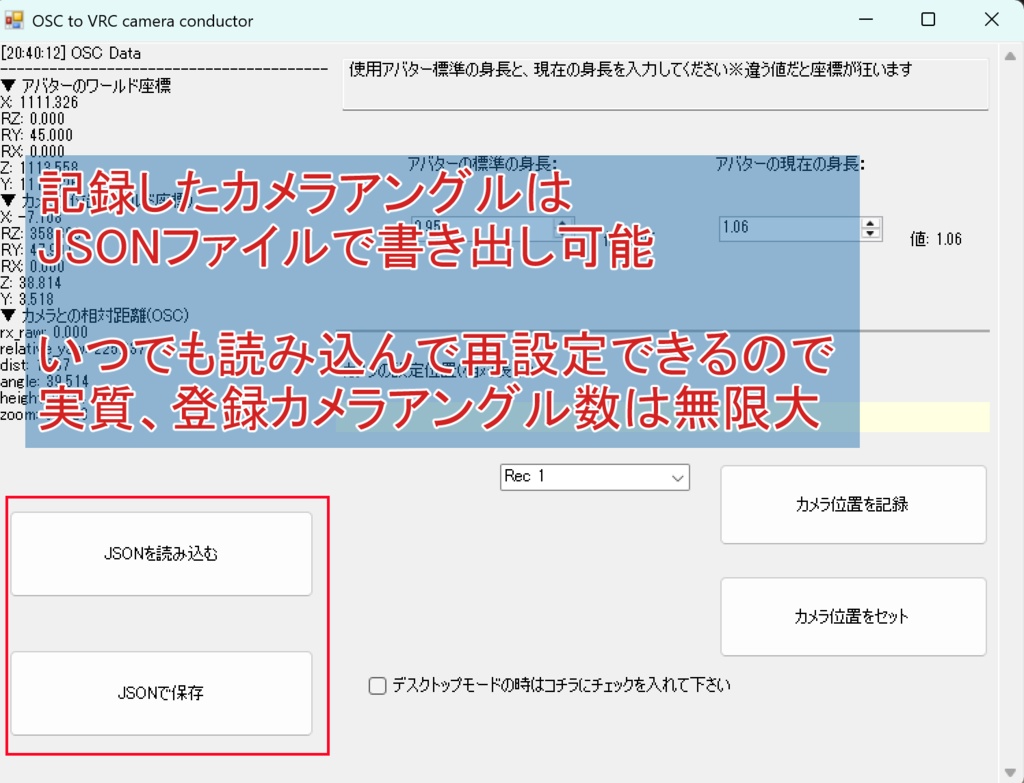
登録したカメラアングルと配置は、JSONファイルで書き出し、読み込みが出来るので、実質、登録できるアングルは無限大! Can be exported as a JSON file! Since registered camera angles and layouts can be exported and imported as JSON files, the number of angles you can register is effectively unlimited!
カメラアングル呼び出しは簡単1タッチ!
登録したアングルを呼び出すには、専用アプリ上、Exメニュー、タッチ操作可能なパネルから呼び出せます。 パネル操作なら、1タッチでアングル切替が可能になります。 Switching camera angles is as easy as a single tap! To access a saved angle, you can do so via the dedicated app, the Ex menu, or the touch-sensitive panel. Using the panel, you can switch angles with a single touch.
デスクトップでも使用可能!
専用アプリ上からも登録、呼び出しが出来るので、デスクトップモードでも使用可能です。 Now available for desktop too! You can register and make calls directly from the dedicated app, so it can also be used in desktop mode.
取り付け専用の拡張Editorが付属
1ボタンでセットアップを完了してくれる、取り付け専用の拡張editorつき。 また、取り付けにはModular Avatarを使用しています。 Modular Avatarを導入してから取り付けて下さい。 Includes a dedicated installation editor Includes a dedicated installation wizard that completes setup with a single click. This installation uses Modular Avatar. Please install Modular Avatar before proceeding with the installation.
法人向けをご購入の方に
法人向けをご購入の際は、CameraMasterOSC専用のDiscrodチャンネルでリアルタイムにサポートさせて頂きます。 購入後にDLできるzipファイルから、ご参加ください。
ファイル構成
以下のファイルをDLしてご使用ください。 osc_camera_gimmick x_xxx.zip…アバターに取り付けるprefab osc_camera_gimmick_setup_tool_vx_x.zip …セットアップ補助ツール VRChatと同時に起動するソフト VRChatCamera_Controller_OSC送受信用アプリ_1_6.zip…OSC送信アプリ本体 VRChatCamera_Controller_簡易機能版_v1.zip…上記ソフトの配信用に絞った簡易版 TimeLineEditor CameraMasterOSCを使ったタイムラインの作成、編集するソフト File Structure Please download and use the following files. osc_camera_gimmick x_xxx.zip…A prefab to attach to your avatar osc_camera_gimmick_setup_tool_vx_x.zip …Setup assistant tool Software to run alongside VRChat VRChatCamera_Controller_OSC_Transmission_and_Reception_App_1_6.zip… Main OSC transmission app VRChatCamera_Controller_Simplified_Function_Version_v1.zip… Simplified version of the above software focused solely on transmission TimeLineEditor Software for creating and editing timelines using CameraMasterOSC
動作環境
本ソフトは以下の環境で動作します: Windows 10 / 11(x64) .NET Framework 4.8.1 以上 VRChat SDK 3.10.3 以上 Visual C++ 再頒布可能パッケージ 2015-2022 (x64) FFmpeg ModularAvatar ※モニタリング機能使用をする場合は VRCFury等のparameter compressor系のツールの使用を推奨 ※録画機能推奨スペック (1080p/30fpsで安心して録画したい場合) CPU: Intel Core i7-10世代以降 / AMD Ryzen 7 3700X 以降 GPU: NVIDIA RTX 3060以降(VRChat用のGPUと同一でOK) メモリ: 32GB ストレージ: NVMe SSD、録画先はVRChatと別ドライブ VRChatのフレームレート: 録画時に安定して60fps以上出る設定・環境 使用ライブラリ Newtonsoft.Json Rug.Osc Sanford.Multimedia.Midi Vlc.DotNet This software runs on the following platforms: Windows 10 / 11 .NET Framework 4.8.1 or later VRChat SDK 3.10.3 or later ModularAvatar When using the monitoring function, we recommend using a parameter compressor tool such as VRCFury. Libraries used Newtonsoft.Json Rug.Osc Sanford.Multimedia.Midi Vlc.DotNet
更新履歴
2026/10/7 コントロールアプリ ver4.00 アバターギミック ver4.00 TimeLineEditor ver4.00 SteamVRオーバーレイアプリに対応しました。 それにともない、ギミックで擬似的に表示していたのUIメニューがなくなりました。 被写界深度に対応しました。 dolly_addon ver2.20 プレーヤーの位置再現が同期されず正しく表示されていなかったのを修正しました このバージョンから本体unitypackageに同梱することにしました。 2026/9/14 TimeLineEditor 3.5 任意のOSCの送信や、ドリーカメラや回転カメラのロール回転やスピード、高さ調整などに対応しました。 上記TimelineEditorに対応する形で以下のアップデートを行いました。 コントロールアプリ ver3.35 アバターギミック ver3.35 dolly_addon ver2.0 prefabは一度[カメラ操作ギミック]をフォルダごと消去してからインポートして下さい。 2026/9/6 TimeLineEditor 3 本体ドリー機能がTimeline editorから扱えるようになりました。 既存のmidi連携だけでなく、内蔵プレーヤーが扱えるようになりました。 スロット画像をSpoutから取得できるようになりました。 コントロールアプリ ver3.30 TimeLineEditor 3からドリー機能を制御するのに必要な修正を加えました。 TimeLineEditor3と併用する場合は、こちらをお使い下さい。 dolly_addon ver 1.5 TimeLineEditor3から扱うための修正を加えました。 アバターギミック ver3.30 TimeLineEditor3に対応するように修正を加えました。 2026/8/28 セットアップツール 3.20 コントロールアプリ ver3.20 アバターギミック ver3.20 Dolly_addon ver.1.20 ドリー機能が追加されました。 3.20のセットアップツールとprefabを使用ください。 (World_Pose_Getter 3.1のままで大丈夫です) 2026/8/9 共有機能に特化したprefabを用意しました。 通常版と同様、world_pose_getter(3.1)と一緒にrootに配置した後、セットアップツール(3.1)を使って設定して下さい。 Spout録画が二重起動で録画失敗してしまうバグを修正しました。 コントロールアプリ ver3.03 アバターギミック ver3.03 2026/7/23 コントロールアプリ ver3.01 アバターギミック ver3.01 セットアップツール ver3.01 モニタリング機能のカメラの構造を修正しました。 これにより、VRC公式カメラとの変化が少なくなりました。 それに伴い、構造が変化したのでセットアップツールもアップデートしました。 また、これにより、従来の方式だと180°画角が変化してしまうため、コントロールアプリに切り替えれるトグルを作成しました。 2026/7/15 コントロールアプリ ver 2.01 アバターギミック ver 2.01 共有カメラでプレーヤーの位置より、下に移動したときに画面表示がおかしくなるのを修正しました。 回転カメラ時に、タッチパネルやUIが写りにくくしました。(カメラの距離によっては写ってしまいます) Spout録画機能でUIが上手く反映されないのを修正しました。 2026/07/13 コントロールアプリ ver 2.00 アバターギミックver 2.00 Sout録画に対応しました。 共有モニタを縦型表示出来るようになりました(手動) 2026/6/29 アバターギミックver 1.93β 共有モニタを縦向けにする機能をつけました。 共有モニタに黒枠が付きました 2026/6/3 コントロールアプリ ver.195 VRChatCamera_Controller_OSC送受信用アプリ_195.zip OSCQueryに対応しました。 複数のOSCアプリが同時使用できます。(※OSCQuery対応ソフトのみ) VRモードだと、[ワールド基準で記録]がズレるのを修正しました。 2026/5/20 アバターギミックver 1.9 osc_camera_gimmick2_19.zip タッチパネルが距離に関係なくカメラに映らなくなりました。 VRChatCamera_Controller_OSC送受信用アプリ_19.zip FPSが低い状態だとスイッチング後、飛行モードから戻らない現象を解消しました。 その分、複数回切り替え音がなりますので、サウンドのUIをミュートにするのをおすすめします。 2026/5/12 ver1.82 VRChatCamera_Controller(OSC送受信用アプリ)_182 コントロールアプリがビルド方式の問題で、環境によって上手くアプリが動かないケースがあったので、ビルドの方式を変更しました。 上手く動かなかった方は、上記のファイルをDLして解凍後、releaseフォルダ内にあるWGP.exeを実行して起動させて下さい。 2026/4/30 ver1.81 VRChatCamera_Controller(OSC送受信用アプリ)_181 アプリ側の起動時に読み込まれる初期設定ファイルを変更できるようにしました。 こちらはアプリ側だけの変更でOKです。 2026/4/29 ver1.8 モニタの移動範囲をある程度限定することで通常版のExParameterの負荷を低減させました。 回転カメラの設定を見直し、レイヤー抜けがなくなるように設定しました。 デスクトップモード専用の前方を確認できる「サブモニタ」を表示できるようにしました。 osc_camera_gimmick2_18 とVRChatCamera_Controller(OSC送受信用アプリ)_18 をお使い下さい。 2026/4/26 ver 1.7 1000unitの領域でも使用できるようになりました。 2026/4/18 VRChatCamera_Controller(OSC送受信用アプリ)1_63 VR内で自動切替を一時停止が出来るようになりました。 こちらをご利用するには対応するosc_camera_gimmick2_163に変更してください。 また、共有機能を使わない軽量バージョンを同梱しました。 2026/4/17 VRChatCamera_Controller(OSC送受信用アプリ)1_627 カメラ切り替え時に発生する"飛行モード"の間隔を短くしました。(飛行モードがオフにならない方は[設定]-[自動撮影設定]からタイミングを調整してください。) これにより、移動時にスイッチングしても、カメラが動く誤差を少なくできます。 2026/4/16 TimeLineEditor1.0 を追加しました。 StudioOneと連携して、タイムライン機能で作成したJSONをGUIで編集できます。(要:送信用アプリ1.625) VRChatCamera_Controller(OSC送受信用アプリ)1_625 回転カメラの挙動を修正。 TimeLineEditorと連携できるようになりました。 2026/4/5 VRChatCamera_Controller(OSC送受信用アプリ)1_62 カメラマンモードを、フラグのON/OFFで切り替える形式から、記録時にプレーヤー基準の[相対位置の記録]と[ワールド基準で記録]のボタンで保存する形に変更しました。 また、それぞれのモードで対応するボタンの色が変わるようになりました。 2026/4/2 osc_camera_gimmick2_161をアップしました 回転カメラの高さがプレーヤー基準ではなくワールド原点基準になっていたのを修正しました。(ワールドにおって高さの差が出ていました) 2026/4/1 VRChatCamera_Controller 1.6をアップしました osc_camera_gimmick2_16と対応していますので、そちらにprefabをアップデートしてください。 登録したカメラアングルをランダムで切替られる機能を追加しました。 回転カメラの高さと注目点を調整出来るようになりました 2026/3/27 VRChatCamera_Controller 簡易機能版を追加しました。 タイムライン機能のない配信に必要な最小限のボタン構成になっています。 2026/3/8 OSC_camera_gimmick2.15 VRChatCamera_Controller v1.15 カメラマンモードを追加しました。 カメラマンモードでは、記録後にプレーヤーが動いても、元の場所にスイッチングできます。 (※但し、FlyCameraで移動できる制限内に限ります) UIを少し整理しました。 アバターギミックと、新しい制御アプリをご使用下さい。 2026/2/6 OSC_camera_gimmick2.14 モニターの反転モードにバグがあったので修正しました。 モニタリング機能用のカメラの精度をあげました。 VRChatCamera_Controller v1.14 モニタリング機能に送信するデータのパラメータを増やしました 2026/1/17 ver 2.13 モニタの固定がうまく動作しなかったのを修正しました。 VRChatCamera_Controller v1.13 OSC通信タスクが解放されないバグがあったので、修正しました 2025/12/18 ver 2.1 タイムライン機能が付きました。(βテスト版) 2025/12/22 ver2.12 意図せずにカメラジャック機能が働いてしまうバグを修正しました。 OSC_camera_gimmick2.12にアップデート後 VRChatCamera_Controller(OSC送受信用アプリ)βテスト版1.1 をお使い下さい。
利用規約/ライセンス
作者は、本データの使用によって生じたいかなる損害についても責任を負わないものとします。 ・アバターに組み込んでVRChatへアップロードを許可します。 ・ 改変、商用利用 いずれも可 ・ ギミック使用の表記は必要ありません 本データそのものの再配布はしないでください。ただし、改変代行依頼のために本データの一部または全部を個人間で受け渡すことは許可します。 その他、バグ等や質問ございましたらReadme記載の連絡先から作者に問い合わせて下さい。 また、当ギミックは以下の技術を利用しています。 The author shall not be held liable for any damages arising from the use of this data. ・ You are permitted to incorporate this data into an avatar and upload it to VRChat. ・ Modifications and commercial use are both permitted. ・ No attribution is required for the use of this gimmick. Please do not redistribute this data itself. However, transferring all or part of this data between individuals for the purpose of requesting modification services is permitted. If you have any questions or encounter bugs, please contact the author using the contact information provided in the Readme. Additionally, this gimmick utilizes the following technologies: --- ## ライセンス 本ソフトウェアは **MIT License** のもとで公開されます。 ``` MIT License Copyright (c) 2026 amanokazumi Permission is hereby granted, free of charge, to any person obtaining a copy of this software and associated documentation files (the "Software"), to deal in the Software without restriction, including without limitation the rights to use, copy, modify, merge, publish, distribute, sublicense, and/or sell copies of the Software, and to permit persons to whom the Software is furnished to do so, subject to the following conditions: The above copyright notice and this permission notice shall be included in all copies or substantial portions of the Software. THE SOFTWARE IS PROVIDED "AS IS", WITHOUT WARRANTY OF ANY KIND, EXPRESS OR IMPLIED, INCLUDING BUT NOT LIMITED TO THE WARRANTIES OF MERCHANTABILITY, FITNESS FOR A PARTICULAR PURPOSE AND NONINFRINGEMENT. IN NO EVENT SHALL THE AUTHORS OR COPYRIGHT HOLDERS BE LIABLE FOR ANY CLAIM, DAMAGES OR OTHER LIABILITY, WHETHER IN AN ACTION OF CONTRACT, TORT OR OTHERWISE, ARISING FROM, OUT OF OR IN CONNECTION WITH THE SOFTWARE OR THE USE OR OTHER DEALINGS IN THE SOFTWARE. ``` --- YozoLab https://yozolab.booth.pm/ [YL-ATG] https://github.com/YozoraKurage/YL-ATG -------------------------------------------------------------- Newtonsoft.Json 著作権:James Newton-King ライセンス:MIT License -------------------------------------------------------------- Rug.OSC 著作権:RugCode ライセンス:MIT License | [Spout2](https://github.com/leadedge/Spout2) | BSD 2-Clause License | Spout2テクスチャの受信(DirectX11ネイティブ) | | [NAudio](https://github.com/naudio/NAudio) | MIT License | WASAPI経由のデスクトップ音声/マイク音声のキャプチャとミキシング |